Understanding Networks
Everwondered how YouTube open in your device and how when you search a particular video it appears to you ? Looks pretty simple from outside but it is much more deep and interesting from inside. So if you are interested in knowing the inner mechanism of all this than this blog is for you lets start our journey.
First we’ll start with understanding what is a network and what is a internet.
Network :
A network is a group of two or more devices (computers, mobiles, printers, etc.) connected together so they can share data and resources.
Like for an example your TV , Mobile , Printer all these are connected to your home network which is to your WiFi router. They can:
Share internet
Send files
Use the same printer
Internet :
The Internet is a global network of networks. It connects millions of smaller networks all over the world. And here we will discuss our YouTube example , how actually it works? :
Step 1: Your Device joins a Network
Your mobile phone connects to your home Wi-Fi router
This Wi-Fi router connects:
Your phone
Laptop
TV
This group is a LOCAL NETWORK (LAN)
Step 2: Router connects to ISP (Another Network)
Your Wi-Fi router is connected to an ISP (Internet Service Provider)
- Example: Jio, Airtel, BSNL
ISP also has its own large network
Now:
Your home network
ISP network
are connected together
Step 3: ISP connects to YouTube’s Network
YouTube is stored on Google’s servers
These servers are part of Google’s private network
ISP connects to Google’s network through high-speed global cables
Now multiple networks are connected
This collection of connected networks is called the Internet
Step 4: Request–Response (Very Important Concept)
Request
When you tap Search on YouTube:
Your phone sends a request
“Give me this video”
This request travels:
Phone → Home Network → ISP Network → Google Network
Response
Google’s server finds the video
Sends data back in small packets
Google Network → ISP → Home Network → Your Phone
Video starts playing
So we understanded how all this works but many of you will ask how the internet itself reaches our home so lets discuss this also :
Step 1: Internet Exists on Big Servers (Far Away)
Websites like Google, YouTube, WhatsApp live on huge servers
These servers are placed in data centers
Data centers are connected by very high-speed cables
Step 2: Global Connection Using Cables (Backbone of Internet)
Countries are connected using:
Undersea fiber-optic cables
Land fiber cables
These cables carry data as light signals
This forms the global internet backbone
Step 3: Internet Comes to Your City (ISP Level)
Internet enters your city through ISP (Internet Service Provider)
ISP examples (for understanding): Jio, Airtel, BSNL
ISP has:
Huge routers
Fiber cables
Control centers
ISP buys internet from global providers
ISP distributes internet to homes
Step 4: Internet Reaches Your Local Area
From ISP office:
Internet is sent through:
Fiber-optic cable (most common now)
Copper cable (older)
Mobile towers (for mobile data)
This cable reaches your street / building
Step 5: Internet Enters Your Home
A cable enters your house and connects to a device:
Modem / ONT
Converts light/electrical signals into data
Acts as a translator
Without modem → internet is useless to your devices
Step 6: Router Creates Your Home Network
Router takes internet from modem
Creates:
Wi-Fi
LAN ports
All devices connect to this router
Now internet has reached your home

Looks interesting , let us now understand how our network connects to the internet.
So for this we need to understand few things like modem , routers , hub , switch , etc.
A modem and router are two of the most frequent components in a home network configuration. A router establishes a local area network (LAN), whereas a modem connects to an internet service provider (ISP). For a home network to work, both devices are necessary.
Modem :
Modem stands for Modulator/Demodulator. The modem is defined as a networking device that is used to connect devices connected in the network to the internet. The main function of a modem is to convert the analog signals that come from telephone wire into a digital form.
Working of Modem
The two main components of a modem are modulation and demodulation. Where the modem can perform both tasks simultaneously. The step-by-step working of the modem is given below:
Step 1: Data Generation: When data needs to be transmitted it is first generated. Therefore computer system generated the data which is in digital form of 0s and 1s.
Step 2: Modulation: Modulation is defined as a process of converting digital data signals of the computer into analog data signals so that these signals can travel on the internet. The digital data is encoded onto a carrier wave.
Step 3: Transmission: The resultant of modulation that is modulated data is transmitted over the communication line to the modem that is receiving it.
Step 4: Demodulation: Demodulation is defined as a process in which analog data signals from the internet are converted into digital data signals so they can be understood by computer systems. In the process of demodulation the digital data from the carrier wave is decoded.
Step 5: Decoding: The resultant of demodulation that is demodulated data is being sent to the computer systems for their further use.
Router :
A router is a networking device that forwards data packets between different computer networks. It connects multiple packet-switched networks or subnetworks, managing traffic by directing packets to their intended IP addresses. Routers allow multiple devices to share an Internet connection efficiently. It takes internet from the modem and shares it among multiple devices.
How Does a Router Work?
Routers determine the path for a packet by examining its destination IP address and consulting the routing table, which contains information on network paths. They use a set of rules to identify the most efficient route for each packet.
Static routing: Configured manually, suitable for small or stable networks.
Dynamic routing: Automatically updated based on network activity, ideal for large or changing networks.
Difference Between Modem and Router

The basic difference between a Modem and a Router is that a Modem takes Internet Signals from the provider and connects it with your device and a Router takes the Internet from the modem and transfers it to your wireless devices. Both Modem and Router measure the networking devices, wherever a piece of electronic equipment connects your laptop or your network to the Internet Service Provider for accessing the web. To get the internet connection for our network, we both need a modem and router either individually or integrated. We will discuss each Modem and Router in detail.
Hub :
A hub is a basic networking device that connects multiple computers in a network and broadcasts data to all devices.
How a Hub works
Data comes in from one computer
Hub sends that data to ALL connected computers
Even devices for which the data is not meant receive it
*Hub is not intelligent
Switch :
A switch is a smart networking device that forwards data only to the intended device.
How a Switch works
Switch learns MAC addresses of devices
Builds a MAC address table
Sends data only to the correct port
Switch is intelligent
Basic difference between them :
A hub broadcasts data to all devices, whereas a switch forwards data only to the intended device.
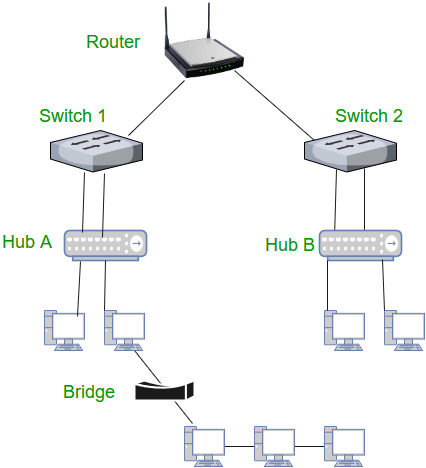
Now we have seen so many thing but the question arises that there are so many thing on internet some useful thing along with some danger like malware , hackers etc. so how and what makes our device safe form danger side of internet , let us check that.
Firewall :

A firewall is a security gate between your network and the internet that monitors, allows, or blocks data based on security rules.
Think of it as:
A security guard for your network
Where is the Firewall placed?
Internet ↓
Firewall ← security lives here ↓
Your Network (devices, servers)
Everything entering or leaving your network must pass through the firewall.
Why do we say “Security lives here”?
Because the firewall is the place where:
Decisions are made:
- Allow or block?
Attacks are stopped:
Malware
Hackers
Unauthorized access
Network rules are enforced
If firewall fails → network is exposed.
How a Firewall Works (Step-by-Step)
1️⃣ Data tries to enter your network
From a website
From an unknown source
From another country
2️⃣ Firewall checks rules
Firewall asks:
Is this traffic allowed?
Is the IP trusted?
Is the port safe?
Is the request normal or suspicious?
3️⃣ Firewall decision
Safe → allow
Dangerous → block
*All happens in milliseconds
Now from our YouTube example if someone got a question about its traffic since YouTube is a very big platform and many users are there so how it holds such big traffic without crashing or slowing down , so here the concept of load balancer comes in the picture lets us see this.
Load Balancer :
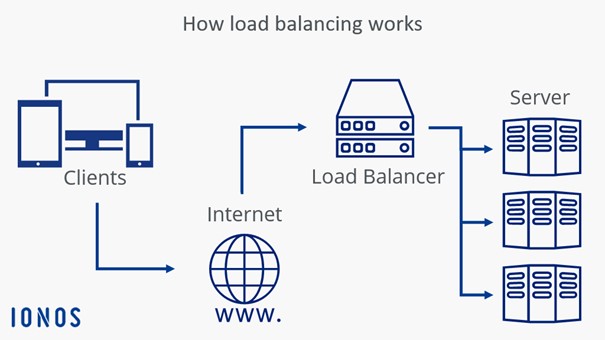
A load balancer is a system that distributes incoming user requests across multiple servers so that no single server gets overloaded.
hink of it as:
A traffic police for servers
Why does the problem exist in the first place?
Without a Load Balancer
Imagine:
Only one server
10,000 users suddenly open a website
Result:
Server becomes slow
Requests fail
Website crashes
One server cannot handle massive traffic alone.
What does a Load Balancer do?
The load balancer:
Receives all incoming requests
Decides which server should handle which request
Sends traffic in a balanced way
How a Load Balancer Works (Step by Step)
1️⃣ User sends a request
Example:
“Open YouTube homepage”
2️⃣ Request hits the Load Balancer
The load balancer checks:
Which server is free?
Which server is healthy?
Which server handled the last request?
3️⃣ Request is forwarded
User 1 → Server 1
User 2 → Server 2
User 3 → Server 3
Load is shared
4️⃣ Server responds
Server sends data back
Load balancer passes it to the user
Why Scalable Systems NEED a Load Balancer
1. Scalability
Traffic increases → add more servers
Load balancer automatically starts using them
No need to change user-side anything.
2. High Availability
If Server 2 fails :
Load balancer stops sending traffic to it
Redirects traffic to other servers
Website stays online
3. Better Performance
No server is overloaded
Faster response time
Smooth user experience
4. Fault Tolerance
Server crash ≠ system crash
Failures are isolated
Now we will conclude all this and see how all these devices works together in a real world example:
Step-by-Step: How Everything Works Together
1️⃣ Internet → Modem
Role: Entry point
Internet comes from ISP (fiber/cable)
Modem / ONT converts ISP signals into usable data
Without modem → internet cannot enter your premises
2️⃣ Modem → Firewall
Role: Security gate (where security lives)
Firewall inspects all incoming & outgoing traffic
Blocks:
Hackers
Malware
Unauthorized access
In homes, firewall is usually inside the router
3️⃣ Firewall → Router
Role: Traffic director (network creator)
Router:
Creates your local network
Assigns IP addresses
Decides where traffic should go
Router decides:
Internet traffic → outside
Local traffic → inside network
4️⃣ Router → Switch
Role: Internal network expansion
Switch connects many wired devices
Used when:
One router port is not enough
Office / lab / data center
Switch is fast & intelligent
Hub is NOT used anymore (legacy only)
5️⃣ Switch → End Devices
Role: Connectivity
Connected devices:
Computers
Printers
Servers
IP phones
Cameras
6️⃣ Load Balancer (for Large Systems only)
Role: Scalability & reliability
Placed in front of servers:
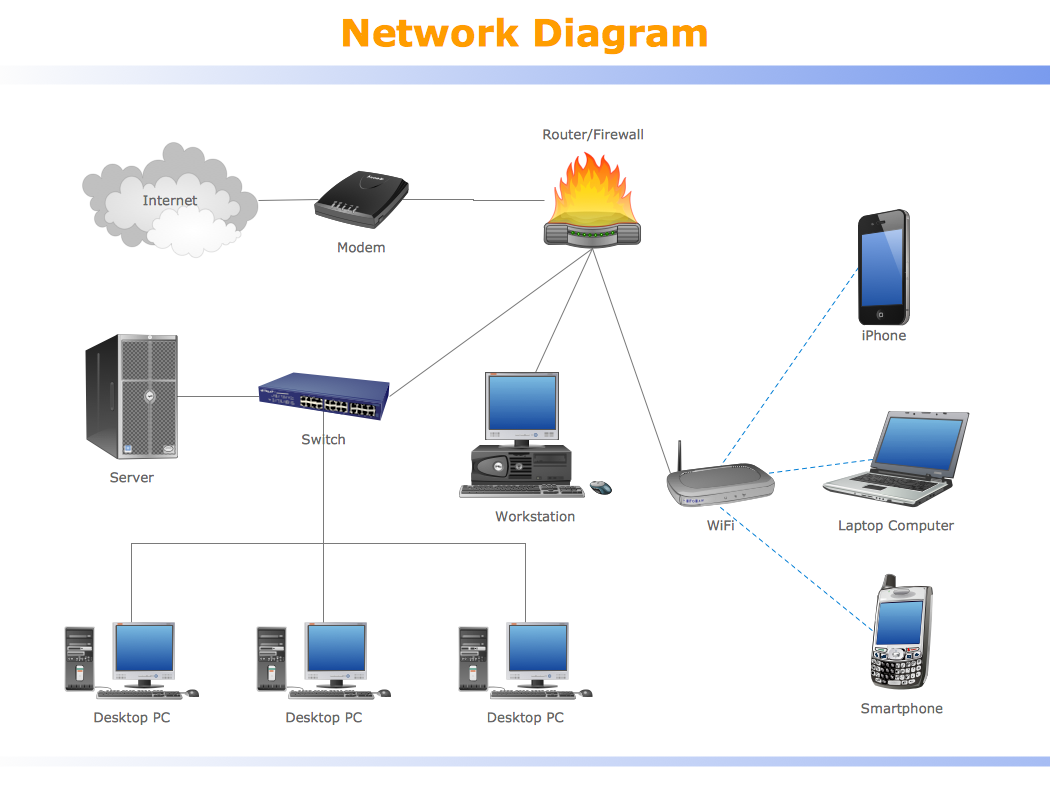
Modem brings internet, firewall secures it, router directs it, switch expands it, and load balancer scales it.
How these are connected to backend system and production deployment ? :
In real-world production deployments, backend systems do not operate in isolation; they function behind multiple networking layers that ensure security, reliability, and scalability. When a user sends a request, it first passes through the internet and reaches a firewall, which acts as the primary security boundary by inspecting and blocking malicious or unauthorized traffic. The request is then forwarded to a load balancer, which distributes incoming traffic across multiple backend servers to prevent overload and to keep the system available even if one server fails. These backend application servers run the actual business logic and APIs, and they communicate with databases, caches, and other internal services through private networks managed by routers and switches. Databases are kept deep inside this internal network and are never directly exposed to the internet, providing an additional layer of protection. Finally, the response travels back through the same path to the user. Together, devices like the modem, router, firewall, switch, and load balancer form the foundation that allows backend systems to run securely at scale, making modern production deployments fast, resilient, and reliable.
So now we are at the end of our journey hope you enjoyed knowing all these network stuff. Thankyou for giving your valuable time for reading this blog hope you get something interesting and valuable , we’ll see you in the next blog till then signing off Thankyou.